
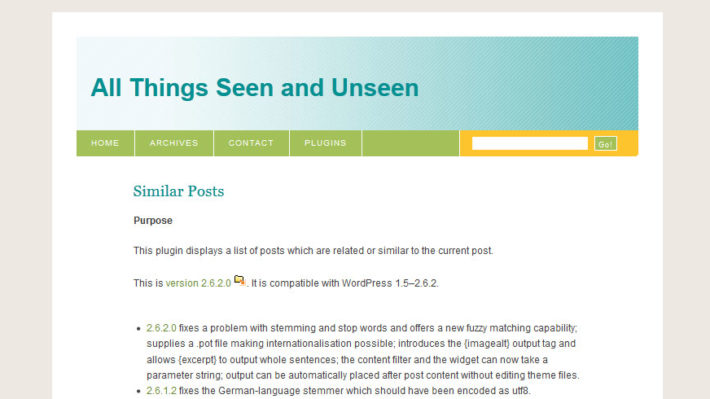
記事に対しての関連性のありそうな記事を表示してくれるプラグインSimiler Postsですが、
ショートコードの使い方に癖があって、
プラグインホームページのコメント欄が{php}が使いにくい等々であふれかえっております。
バージョンアップもされていないので放置されているのはしょうがないことなのです。
{img}というタグもあるけど、どうやらコンテンツ中のimgタグを探して一番最初に見つかった画像を出力している様子。
そこで、アイキャッチ画像(記事のサムネイル)を出力させるショートコードを付け加えたいと思います。
いじくるのはSimiler Postsの使用に必須のPost Plug-in Libraryの中のoutput_tags.phpです。
このファイルの中にショートコードが詰め込まれています。
ということで、どこか場所を見つけて以下を追加。
|
1 2 3 4 5 6 7 8 |
function otf_postthum($option_key, $result, $ext) { $post_id = $result->ID; if(has_post_thumbnail($post_id)){ $str = get_the_post_thumbnail($post_id, 'post-thumbnail'); } return $str; } |
以上です。
ちなみにバージョンの古いwordpressでは、記事のサムネイル機能が無かったため、
Post Thumbnailプラグインを使用して『thumbnail』というカスタムフィールドを作って記事のサムネイルを保存していました。
その為、実際に使用したのは以下。
|
1 2 3 4 5 6 7 8 9 10 11 12 |
function otf_postthum($option_key, $result, $ext) { $post_id = $result->ID; if(get_post_meta($post_id, 'thumbnail', true)){ $image = get_post_meta($post_id, 'thumbnail', true); $str = '<img src="' .$image. '" />'; } elseif(has_post_thumbnail($post_id)){ $str = get_the_post_thumbnail($post_id, 'post-thumbnail'); } return $str; } |
以上。
2011/7/19追記
Output Templateのサンプルは以下です。
|
1 |
<?php similar_posts('limit=5&prefix=<ul id="simposts">&suffix=</ul>&output_template=<li><a href="{url}" class="thumbnail">{postthum}</a><span class="title">{link}</span><span class="cat">{categorylinks:, }</span></li>'); ?> |
上記はテンプレートファイル(single.phpなど)内に直接書き込む場合で、プラグインの設定項目Outputの部分で設定する場合は、
|
1 |
<li><a href="{url}" class="thumbnail">{postthum}</a><span class="title">{link}</span><span class="cat">{categorylinks:, }</span></li> |
この部分になるんではないでしょうか。
記憶が曖昧です xD

- Facebook GraphAPI v2.9でいいね・シェア数をPHPで取得して表示 - 2017年9月7日
- phpstormのFilewatcherでautoprefixerを使う方法 - 2017年1月19日
- Custom Field Templateを使用してのプレビューを実装 - 2016年1月14日
- WordPress:WooCommerceを使ってみて分かったこと - 2013年7月5日
- 誰得なプラグイン Ultimate Google Analytics改をひっそりと公開します - 2013年6月4日
- プラグイン『WooCommerce Fields for Japan』を公開しました - 2013年4月21日
- 公式 WordPress.orgプラグインディレクトリでのプラグイン公開のススメ - 2013年4月17日
- WordPress:WooCommerceを日本仕様へと日本語化 - 2013年4月15日
- webクリエイター パソコンを買う。 - 2013年3月16日
- WordPress:『続きを読む』read moreをpタグで囲む - 2013年3月5日


We are looking for WordPress Bloggers to test our new WordPress Plugin : Tweet & Get it !
and we think that little.ws is a good website to test it.
The plugin allows you to create a download button , which will hold the file you want to make available for download.
In exchange for the file the user will have to:
1. send a tweet (priorly defined by you) 2. follow your Twitter account
If you download it, you will have a demo of what the plugin exactly does :
http://tweetandgetit.com/download/
Don’t hesitate to contact us if you need support to install it.
Let me know what you think about it ? 😉
Best Regards,
Marie de Ubeda
———————————-
Tweet&Get it !
Follow us on Twitter !
http://twitter.com/pointofviuu
http://twitter.com/tweetandgetit
はじめまして。
アイキャッチ画像を表示させたいと思っていたので、とてもとても参考になりました。
ためになる記事が多いので、色々と勉強させていただきます!
こんにちは、
Similer Postsでアイキャッチ画像を出力させる記事
まさにこれをやりたくて辿り着きました。
関連記事のアイキャッチ画像(サムネイル)と記事タイトルのリンク表示を行いたいのです。
Output template:の具体的記述など、もう少し情報を頂けませんでしょうか。
ご教授のほど宜しくお願いいたします。
Output Templateの件ですが、記事に追記してみました 🙂
迅速な回答有難うございます。
うまくできました。
ほんとに助かりました。
有難うございます。
これからも素晴らしい情報の発信を
楽しみにしています。
Pingback: WP3.2.1:plugin:Similar Postsアイキャッチ表示function版 | Memo